
Why 71% of car parts returns are due to compatibility issues and how to avoid them

Most drivers choose parts by make and model then wonder why the part doesn’t fit. The solution is simpler than you’d think.
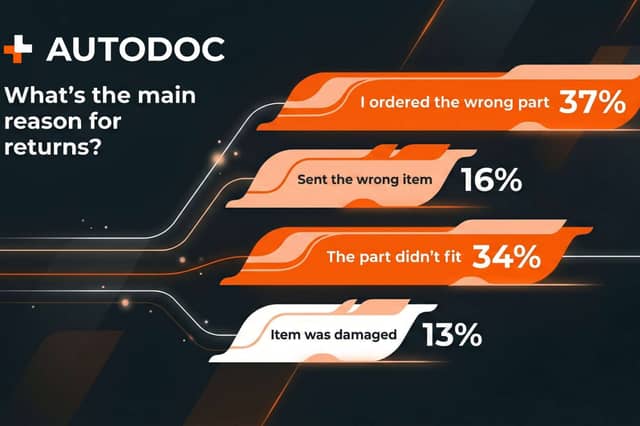
Fear of getting it wrong stops drivers from buying car parts online more than doubts about quality. And for good reason: According to an AUTODOC Instagram survey, 71% of returns happen because of compatibility issues. 37% of customers simply ordered the wrong part, while another 34% received a part that didn’t fit their car.
With 41.4 million vehicles on UK roads (SMMT/Motorparc, 2023) and a £5.3 billion parts market (IBISWorld, 2024), British motorists are turning to online shopping in droves. ECDB/Statista figures show EuroCarParts in the top position with $305 million in revenue in 2024. AUTODOC takes the third spot ($75.5 million) but is growing faster than the competition, up 12.4% in European orders last year. It has earned a 4.3 out of 5 on Trustpilot from nearly 16,000 British customers. Still, compatibility problems persist.
Why drivers skip the critical third step
The mistake is always the same: Pick the make, pick the model, and go straight to "order". But there’s one more step required: Engine type.
Take a 2016 Ford Focus. Sounds specific, but it’s actually dozens of different cars. Petrol engines in 1.0, 1.5, and 2.0 litres. Diesels in 1.5 and 2.0 TDCi. Each has its own brake pads, filters, and belts. What fits a 1.0 EcoBoost petrol won’t work on a 1.5 TDCi diesel.
Then there’s the difference between UK-spec and EU-spec versions. Emission control systems vary, electrics differ, even mountings can be incompatible. Catalogues account for this, but if you skip the engine step, you simply won’t see that information.
First method: Three-step catalogue search
Most online shops use a three-step system.
Choose the make (Ford, VW, BMW). Then the model (Focus, Golf, 3 Series). And then, crucially, select the engine. You’ll be shown a list of options with the power, year, and fuel type.
Where do you find your engine type? Look at section D.2 of your V5C (registration certificate), check the service book, or look for a sticker under the bonnet, usually on the pillar by the driver’s door.
The simplest method for British drivers
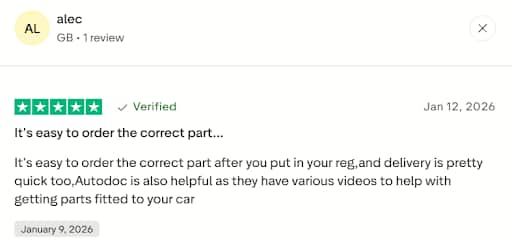
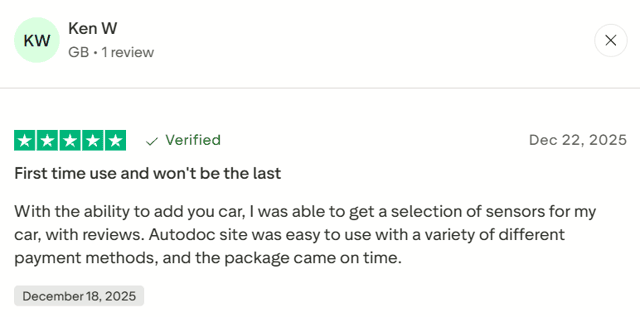
In the UK, many shops let you search by registration number. Type in AB12 CDE and the system pulls everything from the DVLA database automatically: Make, model, year, engine, specification. No need to dig through documents or peer under the bonnet.
The key point is not to confuse the registration number with the VIN. They’re different things. The registration number is simply what’s on your car’s number plate.
Simple and effective.
When you need specialist help
Sometimes the catalogue can’t find your car using the reg number, perhaps because it’s a rare specification, a foreign import, or customised. That’s when the VIN comes in handy, those 17 digits and letters from your vehicle documentation.
The thing is, you can’t enter VIN into search on most sites. That’s not a bug, it’s by design. The VIN is used for speaking with support specialists. In such cases you can use the live chat function to talk to support. Provide them with the VIN and a consultant will select the part manually, accounting for every detail of your specific vehicle.
Galina Stepanova, Head of Customer Feedback at AUTODOC, explains:
"When a customer writes that a part didn't fit, that's not just a return for us. It's a signal to check the catalogue. Over 2024, we corrected more than 12,000 errors in the database this way. Most often it's facelift dates (47% of cases), differences between UK-spec and EU-spec (28%), and rare engine versions (25%). Each correction saves hundreds of subsequent customers from returns."
So contacting support helps not just you, but everyone who orders after you.
The VIN isn't hard to find. It’s in your V5C, line V5. It’s also usually found on a plate located under the bonnet, on the driver's door pillar, and on the bottom left of the windscreen on the driver’s side.
What to check before ordering
1. If you’ve got a UK car: Enter the registration number in search. Check the system’s got the specs right. Order away.
2. If you’re using the catalogue: Choose the make and model. Then select the correct engine type. Check your V5C for this, don’t rely on memory. Cross-check the year. Done.
3. If your car’s unusual: Find your VIN code. Contact support before ordering. Give them the VIN. If you’ve got the part number from the old component, send that too. Wait for confirmation from a specialist. Only then place the order.
Compatibility issues can be prevented
Drivers often mistrust buying car parts online not because of shop quality. They simply lack information on how to choose properly. There are only three methods: Catalogue with engine selection, search by registration number, or consultation with VIN code. Any of them reduces the risk of mistakes to nearly zero.
For Harrogate and North Yorkshire residents, it’s also about saving money. No need to drive to a shop, prices are often lower than dealers. The main thing is to take care when selecting the engine type. You can also just enter your reg. number if you’re buying through a British site.
Until the end of March 2026, Harrogate Advertiser readers can use code ATDDNS1 when ordering from AUTODOC to receive an additional 5% discount. Just make sure you’ve selected the correct parts using one of the three methods described above.